Everything in Concord happens in a conversation. These are the controls around it.

Where you can chat

Home

Cross-portfolio questions and general requests

Brand pages

Everything scoped to one advertiser

Media plan pages

The working surface for building and updating campaigns
Where you start a conversation sets its context. From a media plan, Concord already knows the plan, its campaigns, and its files — so the request can be shorter. You reach a brand or a media plan from the conversation itself, or through the command palette (⌘K, or Ctrl+K).

Finding a past conversation

The command palette (⌘K, or Ctrl+K) looks across your conversations. Faster than scrolling the recent list when you remember the campaign but not when you worked on it.

Temporary chats

Toggle temporary chat on Home to ask something without keeping it. A temporary chat will not appear in your history. Good for a quick check you do not want cluttering the thread list. Not the place for work you will want to come back to — including anything you want a teammate to be able to find later.

Replying to a specific message

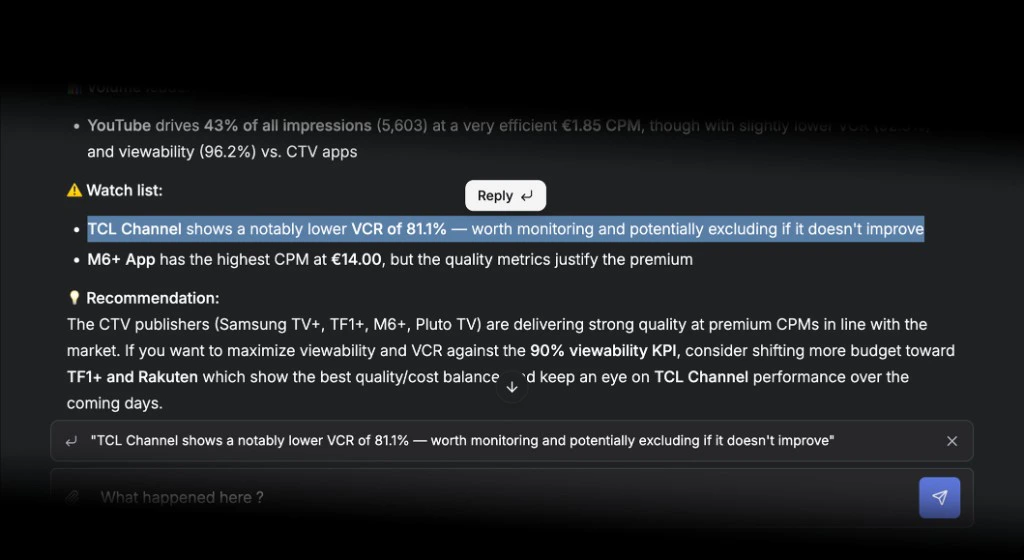
Reply to any message in the thread to point Concord at it. In a long conversation this is the difference between “no, the other campaign” and being understood immediately. Reply to a message
When Concord asks you something

Concord stops and asks rather than guessing when a required detail is missing and your rules do not supply a default. Answer in the thread and it picks the work back up where it left off. If it asks something you would rather it defaulted, that is a good candidate for a Skill: tell it what to assume next time.

Retrying a failed run

When a run fails, retry it from the conversation. Nothing has to be re-typed.

Selecting text to ask about it

Select any text in the app and ask Concord about the selection. Faster than describing what you are looking at.

Long conversations

A conversation that runs for a long time is condensed as it goes so it can keep going. It works, and it has a cost worth understanding — see Long conversations. The short version: one task, one conversation.

Shortcuts

Open the command palette to jump anywhere — a new conversation, Home, any settings page — without navigating.

Browser notifications

Kick off a long campaign build, switch to another brand, and let Concord call you back. See Notifications.

Best practices

Be specific. Budget, dates, targeting, objectives, split logic — in the first message. Paste the brief. Attach it or paste it. Concord reads the whole document and builds from it, which beats re-entering every detail. Chat where the work is. A request from the media plan page needs less context than the same request from Home.