Organization Instructions are the shared context for your workspace: a short summary of who you are. Concord uses it as background context in every conversation, so you do not have to restate it in each request.

Open Organization Instructions

Settings → Organization → Organization Instructions.

What to put in it

Keep it to the context that is true of your organization regardless of the request:
  • Whether you are an agency or an advertiser, and the markets you buy in
  • The kind of buying you do, and the platforms you run on
  • The currency you report in
  • The KPIs that matter to you

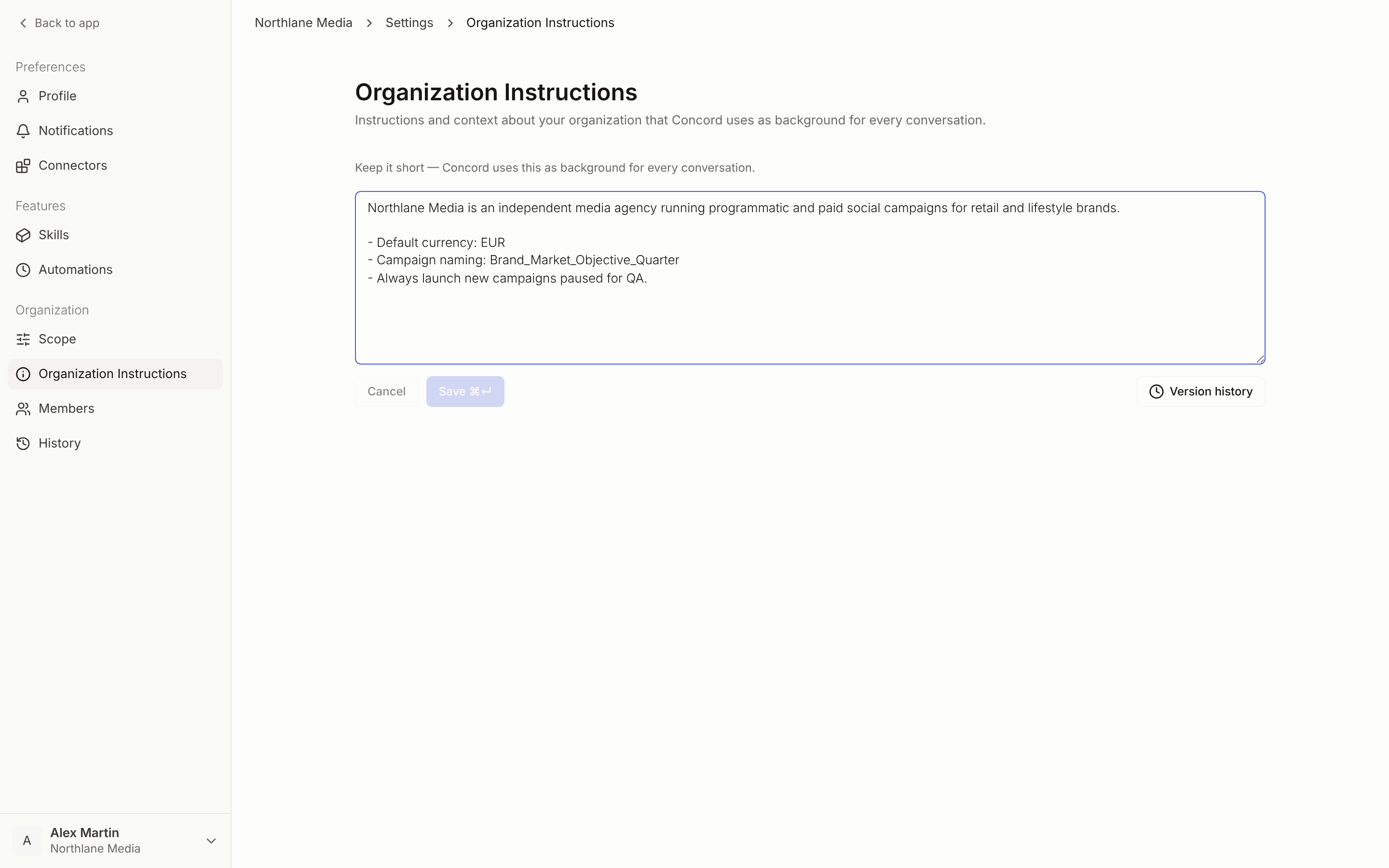
Example

Edit and restore

Type in the text field and click Save, or press Cmd/Ctrl + Enter. Cancel discards unsaved changes. Version history lists earlier versions so you can restore one. The Organization Instructions editor with Version history Only Owners and Admins can change Organization Instructions.
Instructions or a Skill?

Organization Instructions are background — a couple of sentences about who you are, carried in every conversation. Anything that is a rule belongs in a Skill: a naming convention, a QA checklist, a report format, a platform habit. Skills are named, readable, scoped, and loaded when they are relevant, which is why many of them can exist without weighing on every conversation. If you find yourself writing “always do X” in your Organization Instructions, it is a Skill. Understanding Skills · Roles and permissions